James Whyte

Braideded: Dissertation
This tech demo was created for my dissertation. I recreated two time manipulation mechanics from the game Braid, those being Rewind and Time Dilation, while following industry-standard programming principles and practices, such as the SOLID principles and Design Patterns. GitHub version control was utilised throughout its development. The purpose of this artefact was to refine my understanding and application of technical programming practices and produce a portfolio piece that will support my goal of becoming a programmer in the games industry.
This project was developed in Unreal Engine 5.6.1., programmed with C++. Source Code is available at the bottom of the page.

Use of Interfaces
The application of interfaces in various instances through design patterns, such as Command and Memento, allowed adherence to 3 of the SOLID principles: Dependency Inversion, Open-Closed, and Liskov Substitution.
Dependency Inversion Principle can be seen through the application of the Command pattern, the mechanics' inheritance of an interface that provides functions that define their execution; that interface being IAction. This provides more flexibility to the mechanics as it allows them to inherit from different base classes that suit their functionality better whilst having access to the same functions to execute their logic.

The Open-Closed principle applies to all inhabitants of interfaces, but most prominently observed in actors that interact with the time manipulation mechanics. Actors that are to interact with the mechanics inherit the corresponding mechanic's interface. This will provide various functions for the actor to inherit and implement logic into that will be executed by the mechanic, preventing the need to modify the existing code.

The execution of interfaces' functions follows the Liskov Substitution principle. For example when the Rewind mechanic stores snapshots of actors, the type of actor does not and should not affect this process.

Rewind Mechanic
The Rewind mechanic starts by getting a list of all actors that inherit the IRewindable interface. This only has to be performed once as the demo uses Object Pooling to manage actors.

Once the Rewind component has stored a list of all rewindable actors, it uses the Memento pattern by storing snapshots on tick for each rewindable actor, snapshots are captured by calling the IRewindable's IGetCharacterSnapshot function. The number of snapshots that can be stored is restricted by an integer that can be adjusted to suit the number of rewindable actors in the level.

Once the Rewind is activated, tick is disabled to prevent new snapshots, calls enter rewind state disabling the movement, animation, and collision of all rewindable actors, and allows the player to restore frames. The snapshot of each actor correlates to the current frame index which can be increased and decreased based on player input.

When the player finds their desired frame, they can deactivate the rewind, enabling tick, the rewindable actors' movement, animation, and collision, as well as removing all snapshots ahead of the chosen frame from storage. This means the player still has access to frames captured before the chosen frame.


Time Dilation Mechanic
The Time Dilation mechanic starts by setting the parameters of the Time Dilation object in the level and creating the Time Dilation formula.

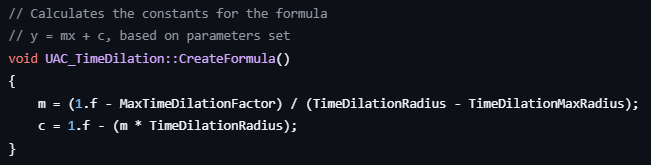
The Time Dilation factor that is applied to Dilatable actors is calculated using the equation of a line. The CreateFormula function calculates the constants of the equation (m and c) with the values that define the parameters of the Time Dilation object.
On activation, the Time Dilation actor is spawned from the Object Pool at the player's position.

On deactivation, the Time Dilation actor is despawned and sent back to the object pool. If any Dilatable actor's have a Time Dilation factor applied to them it is cleared.

In the Record function, which is called on tick, the code checks if any Dilatable actors are within range of the Time Dilation actor, if so it calculates the Time Dilation factor to apply to them by calling the CalculateTimeDilationFactor function.

